 To become an advocate, you can create a GiveCampus user account. When you create your account, you’ll be able to see an Advocacy Dashboard button on the Week for Witt campaign page.
- Visit: https://www.wittenberg.edu/week-for-witt
- Click on the Advocates tab at the top of the web page. Or, you can scroll down to the Advocates section to create a GiveCampus user account.
- On the left side of the screen, you’ll see a list of Advocates for the Week for Witt campaign.
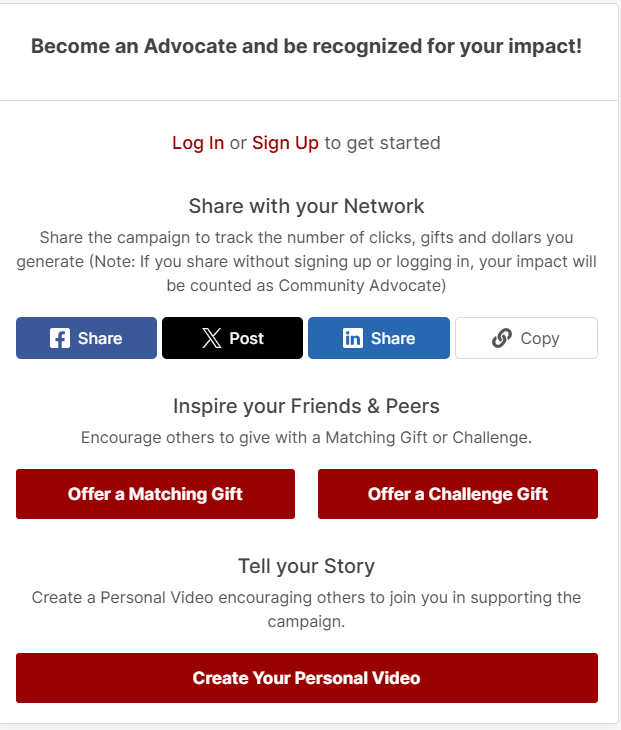
- On the right side of the screen, you’ll see a section titled, “Become an Advocate and be recognized for your impact!”
- Click on Sign Up to get started.
- Create your account by filling out your name and email address. You also will need to create a password. If you already have an account from a previous campaign, click on Sign In. Click on your Advocacy dashboard.
Once you view your Advocacy Dashboard, you will have access to the following features:
- Match and Challenge prompts and progress tracking
- Personal video upload settings and approval status
- Tools for sharing the campaign link
- How-to instructions for using the Advocate Tools
Share With Your Network
While logged into your GiveCampus user account, all sharing buttons generate a campaign link that is unique to you. When you use these buttons to share the campaign or the advocacy dashboard, your impact will be tracked and celebrated next to your name on the Advocates tab on the Week for Witt campaign page.
Create a Match or Challenge
Leverage your gift to encourage others to give! Offering a match means that you’ll give a number of dollars for every dollar or donor that the campaign receives up to your specified maximum gift amount. Offering a challenge means that you’ll give a gift if the campaign receives a certain number of donors or dollars.
Create Your Personal Video
A personal video is a quick video in which you tell the Wittenberg University community why you’re excited about the campaign, and why others should get involved. A member of the Wittenberg University team will review your video, and as soon as it’s been approved, it will go live on the campaign.
 If you decide not to create a GiveCampus user account, you can still share the Week for Witt campaign with your network using Facebook, X, or LinkedIn. You also can copy the link to share with your friends and family. These tools are located at the top right of the Week for Witt campaign page.
Questions?
If you have any questions, please reach out to us by emailing us at wittfund@wittenberg.edu or call 937-327-7430.